Silicon-Carbon Phone Battery Guide (2026): Best Charging Settings to Reduce Heat and Protect Battery Health
Big smartphone batteries are finally real in 2026. Phones are now shipping with 7,500mAh to 9,000mAh+ capacities in bodies that still feel slim, and most of that progress comes from one hardware shift: silicon-carbon (Si-C) battery technology.
But users are also noticing something else. These new batteries can heat up faster during charging, slow down aggressively after 80%, and sometimes show battery health drops earlier than expected. In most cases, nothing is “wrong.” Silicon-carbon cells simply behave differently than older graphite batteries, and they reward smarter charging habits.
This Lab guide explains what to do (and what to avoid) if you want your silicon carbon battery phone to stay strong long-term.
What a Silicon-Carbon Battery Actually Changes
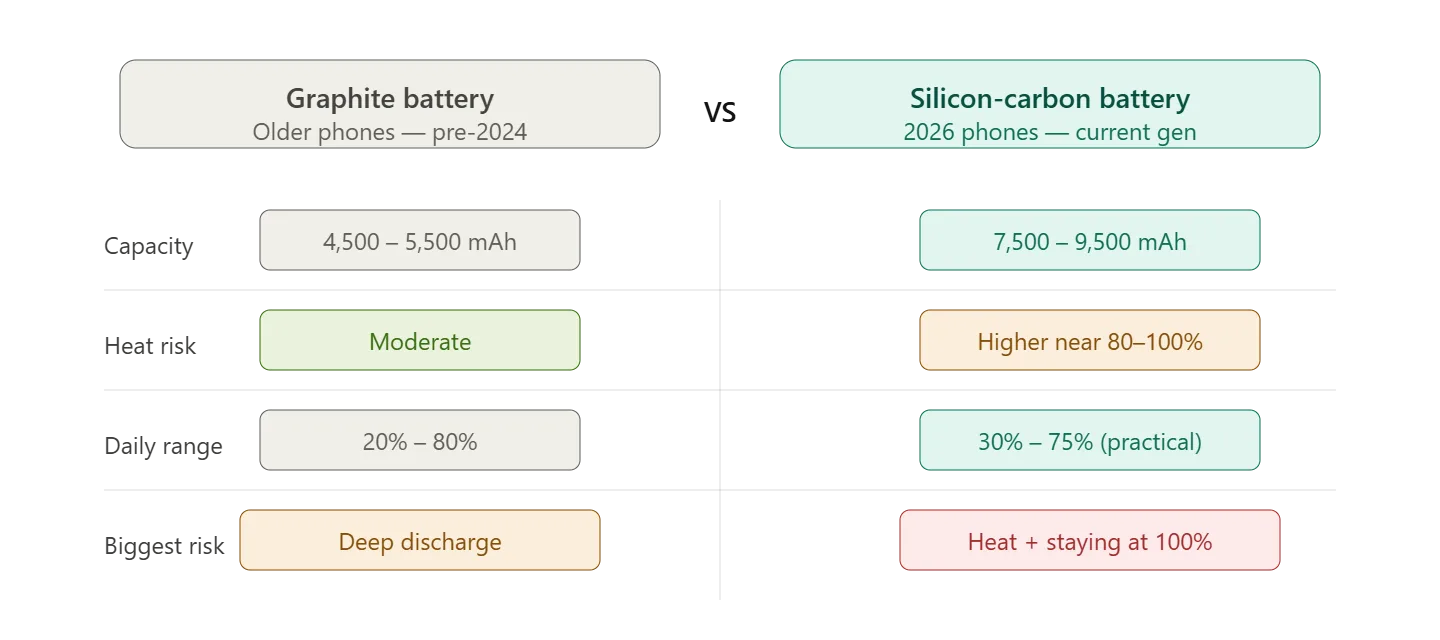
Traditional phones used graphite-based lithium-ion batteries. They were stable, predictable, and forgiving. Silicon-carbon batteries are still lithium-ion, but the anode design is upgraded to store more lithium ions in the same space. That’s why manufacturers can pack huge capacities into slim phones.
The trade-off is that silicon-based structures are more reactive under stress. They handle charging perfectly fine, but they don’t like one specific situation: high charge percentage + heat.
That combination is where long-term wear speeds up.
So if you’ve bought a phone with a monster battery this year, your goal isn’t to avoid charging—it’s to avoid charging heat at the wrong time.
The Lab Protocol: The Best Charging Routine for Silicon-Carbon Phones
If you follow only one section of this guide, follow this one. These are the habits that matter in real life.
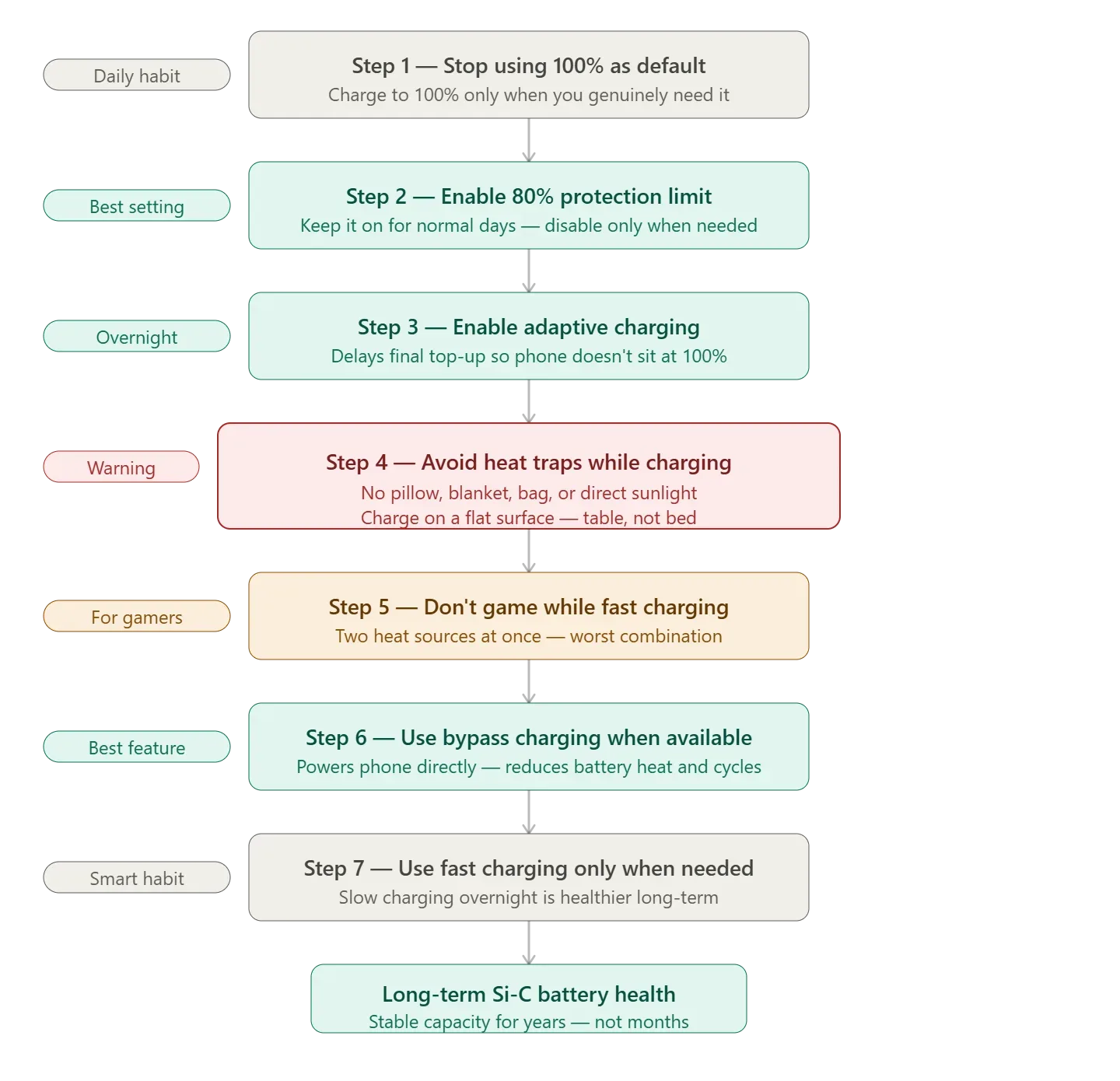
Step 1: Stop Treating 100% Like the Default
A lot of people still charge overnight and keep the phone sitting at 100% until morning. That was never ideal, but with silicon-carbon batteries it’s even worse because full saturation keeps the cell under maximum stress.
Charging to 100% is not harmful by itself. The real damage comes when your phone stays at 100% for hours, especially if it’s warm from charging, case insulation, or background activity.
If you want long-term stability, use 100% only when you actually need it—travel days, long work shifts, or heavy outdoor usage.
Step 2: Use Battery Protection (80% Limit) on Normal Days
Most new phones now include a feature that limits charging to 80% or 85%. Some users disable it because they think they’re “losing battery.”
In reality, this is one of the best features for silicon-carbon battery health.
If your phone supports it, keep it enabled on normal days. You’ll still get excellent endurance because your capacity is already huge. Save full charging for the days you genuinely need maximum range.
Step 3: Enable Adaptive Charging for Overnight Charging
If you charge overnight, adaptive charging is your best friend.
It delays the final part of charging so the phone doesn’t sit at 100% for hours. This is exactly the kind of smart charging behavior silicon-carbon batteries benefit from.
If your phone has “Adaptive Charging,” “Optimized Charging,” or “Smart Charging,” enable it and leave it on.
It’s one of the easiest battery health wins in 2026.
Step 4: Avoid Heat Traps While Charging
This is the part most people ignore.
If you charge your phone:
- under a pillow
- inside a blanket
- in direct sunlight
- inside a bag
- while gaming
you are basically turning charging into a heat chamber.
Silicon-carbon batteries can handle fast charging, but they don’t like trapped heat. If your phone feels noticeably warm during charging, don’t treat it as normal. That heat is long-term stress.
A simple habit like charging on a table instead of on a bed can make a real difference over a year.
Step 5: Don’t Game While Fast Charging
Fast charging produces heat. Gaming produces heat. Together, they push the battery into the worst possible environment.
If you game a lot, don’t play heavy games while fast charging unless your phone supports bypass charging.
This one habit alone is responsible for many “my battery health dropped fast” complaints on new high-capacity phones.
Step 6: Use Bypass Charging Whenever Available
Bypass charging is one of the best battery-saving features of modern Android phones.
Instead of constantly charging and discharging the battery while plugged in, bypass charging powers the phone directly from the charger. That reduces battery heat and reduces unnecessary cycles.
If your phone supports bypass charging, use it during:
- gaming sessions
- long video calls
- editing work
- heavy hotspot use
It’s a feature built specifically for modern high-capacity battery phones.
Step 7: Use Fast Charging Smartly (Not Always)
Fast charging isn’t “bad.” It’s just a tool.
Use fast charging when you need quick power before leaving. But if you’re charging overnight, it’s better to let the phone charge slowly with adaptive charging enabled, especially if your room temperature is high.
In 2026, the healthiest long-term strategy is simple: avoid fast charging when you don’t need it.
Best Daily Battery Percentage Range for Silicon-Carbon Phones
A practical healthy range for most silicon-carbon phones is:
30% to 75%
This reduces time spent at high voltage levels while still giving strong endurance. The best part is that with 7,500mAh+ batteries, you won’t feel restricted the way you would on older 5,000mAh phones.
If your phone has a charge limit option, set it around 80% for normal days.
And if you ever need full battery for travel, charge to 100% without guilt. Just don’t keep it sitting there for hours.
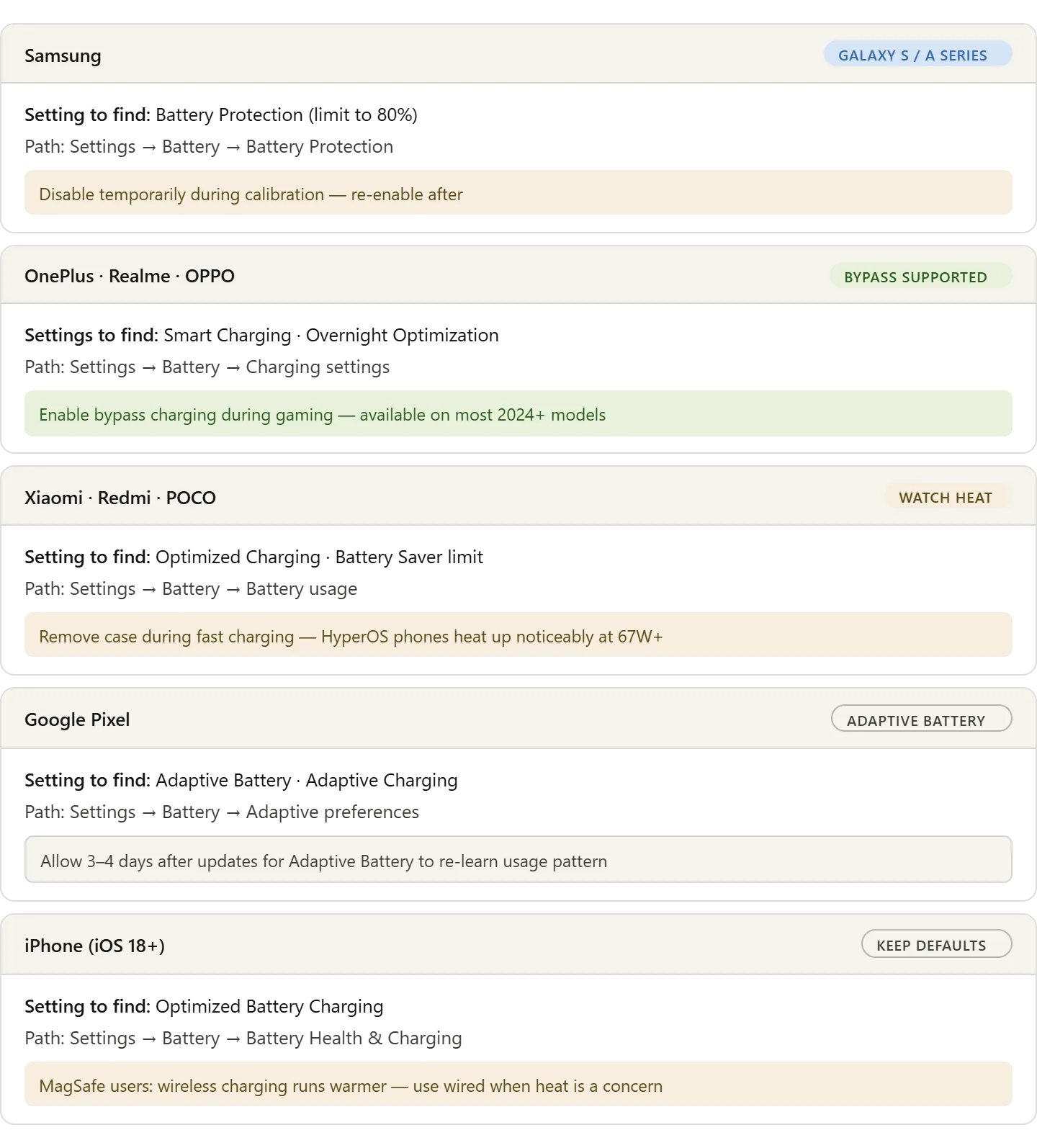
Brand-Specific Settings to Check (Quick)
Most brands offer the same features with different names.
What If Your Battery Health Looks Like It’s Dropping Too Fast?
A lot of users panic when they see battery health decline earlier than expected. With silicon-carbon batteries, some phones may report health changes more aggressively because the voltage curve behaves differently than older graphite cells.
The better way to judge battery condition is real-world endurance. If your phone still gives stable screen-on time and standby performance, the battery is probably fine even if the health number looks slightly lower.
Sometimes battery drain is just a misreading, so it’s worth checking our guide to calibrate your phone battery.
The Verdict
Silicon-carbon batteries are the reason 2026 phones can finally deliver real two-day endurance. But they also introduce a new rule: heat control matters more than ever, especially when the battery is near full.
If you enable adaptive charging, use battery protection limits, avoid gaming while fast charging, and take advantage of bypass charging when available, your silicon-carbon battery can stay stable for years. The goal isn’t to treat charging like a science project—it’s simply to avoid the few habits that create unnecessary stress.
Follow these Lab protocols and you’ll get the best version of next-gen battery life without sacrificing long-term health.
Hardware Reference Library:
- Real-world Si-C performance: [vivo T5 Pro ]
- 9,000mAh Endurance Testing: [ OnePlus Nord 6 ]
- Budget Battery Kings: [ Redmi 15A ]