Meet Clawdmeter: The Open-Source “Tamagotchi” Tracking Your Claude Code Token Usage
Quick Highlights
The “token economy” era has officially entered its hardware phase.
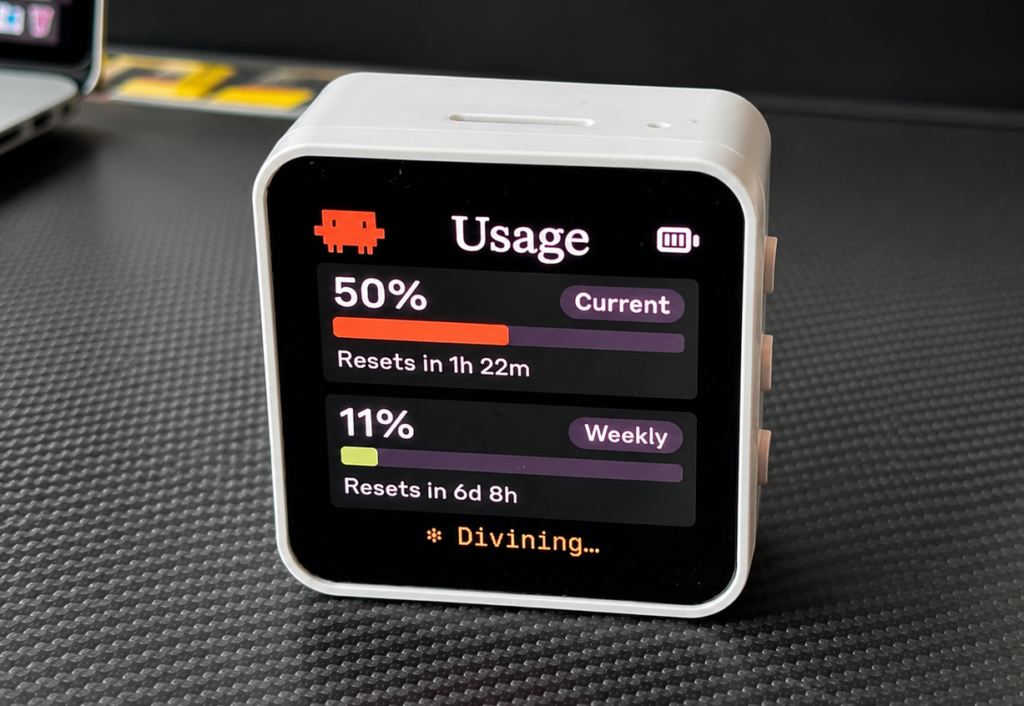
A new open-source project called Clawdmeter is gaining attention in the developer community for doing something oddly specific — and oddly addictive. It turns Claude Code usage statistics into a tiny pixel-art desktop dashboard, letting users monitor their token usage in real time without constantly checking the terminal.
It’s not exactly essential, but that’s the point. Clawdmeter is designed as a fun side device for AI-heavy workflows, and its growing popularity reflects how deeply AI tools like Anthropic’s Claude are becoming part of everyday developer culture.
For official Claude product and developer information, users can refer to Anthropic’s official website.
What Is Clawdmeter and Why Developers Are Talking About It
Clawdmeter is essentially a tiny screen that sits on your desk and displays Claude Code usage stats in a more visual, playful way. Instead of checking terminal commands or usage dashboards, the device shows an animated pixel-art “Clawd” character that becomes more energetic as your usage increases.
It’s designed to be instantly readable, meaning you can glance at it during work sessions to see whether you’re approaching your usage limits.
This kind of “always-visible AI usage tracking” may sound unnecessary, but in the current AI development climate, it taps into a growing culture where engineers track token usage almost like performance metrics.
This shift is similar to what’s happening across productivity platforms as AI becomes a daily tool rather than an occasional feature. We’ve seen the same trend with office software too, especially after Anthropic Expands Claude Into Microsoft 365: Excel, Word and PowerPoint Add-ins Now Widely Available.
Who Built Clawdmeter?
The project was created by Hermann Haraldsson, a software developer based in Reykjavik, Iceland.
Interestingly, Haraldsson isn’t an embedded hardware developer by background. He explained that he had always wanted to experiment with embedded devices but never had the time — until Claude itself helped him build the project quickly.
That detail alone makes Clawdmeter more than just a quirky gadget. It’s also a real-world example of how AI tools are lowering the barrier for people to build hardware projects, even if they’re not specialists.
This “AI-assisted building era” is becoming increasingly common, especially as AI platforms expand into deeper assistant roles. Apple is reportedly exploring a similar future where multiple AI assistants may coexist across devices, as explained in Apple Intelligence Could Soon Let Users Choose ChatGPT, Gemini, or Claude — and It May Redefine the iPhone AI Era.
How Clawdmeter Works
Clawdmeter is built around a compact battery-powered display, with one suggested option being the Waveshare ESP32-S3-Touch-AMOLED-2.16.
Once powered on, the device displays a splash screen with pixel-art animations. As token usage climbs, the animations become more active — essentially turning usage tracking into a dopamine loop.
A middle button lets users cycle through different modes:
Animated usage screen
Session and weekly usage charts
Bluetooth connection status and reset screen
The display remains on the animation mode until the user toggles into the stats screen, keeping the experience lightweight and visually driven.
Bluetooth Buttons Add a “Productivity Toy” Twist
One of the more clever features is that Clawdmeter isn’t just a display — it also acts like a Bluetooth shortcut device.
The side buttons reportedly send keystrokes such as Space and Shift+Tab, which can be used for Claude Code’s voice mode and mode switching shortcuts.
This makes it feel less like a passive gadget and more like a small productivity controller, similar to how streamers use macro pads — except here it’s designed specifically for AI coding workflows.
That’s also why the project feels like it fits perfectly into today’s “AI desk setup culture.”
How It Pulls Claude Usage Data
Clawdmeter reportedly works by reading the Claude Code OAuth token and using it to make an API call that fetches usage data. The usage numbers are pulled from response headers, allowing the device to stay updated with the user’s token limits.
This is important because token limits are one of the biggest constraints for power users. If the device can keep pace with those limits accurately, it becomes genuinely useful, not just decorative.
It also highlights how token usage tracking is becoming a real workflow concern, not just a billing detail.
Open Source, Forkable, and Built for Customization
Clawdmeter is open source, which means developers can fork it and customize:
New animations
Extra screens
Different usage charts
Additional shortcut keys
New “modes” or UI layouts
This flexibility is one reason it has attracted attention quickly. The nostalgic look, combined with modern AI utility, gives it a unique identity — almost like a Tamagotchi, but for your AI token budget.
It also fits into a wider trend where developers are increasingly building small personal tools to optimize their AI workflow instead of relying on official dashboards.
Why Clawdmeter Is More Than a Meme Gadget
At first glance, Clawdmeter looks like a novelty device. But it quietly signals something bigger: AI assistants are no longer “apps.” They are becoming part of daily work infrastructure.
The rise of token dashboards, AI usage tracking, and even hardware add-ons suggests we’re entering a phase where AI tools will be treated like core productivity systems — monitored, optimized, and measured like CPU usage or battery health.
That shift is happening across ecosystems, not just developer tools. Google is building deeper AI integration into its platforms too, including in-car systems, as seen in Android Auto 2026 Update Brings Powerful AI Upgrade: YouTube, Dolby Atmos, and 3D Maps.
TechularZtrix Take: Clawdmeter Is the Fun Side of AI’s Serious New Reality
Clawdmeter might not be necessary, but it’s exactly the kind of “small fun hardware” that developers love.
It combines retro pixel design, real utility, and the modern obsession with AI token usage into a device that feels like a desk toy — but still provides genuinely useful information. And because it’s open source, it has the kind of community-driven future that could make it evolve into something bigger.
In a way, Clawdmeter represents the new normal: AI isn’t just helping people code — it’s shaping the tools, habits, and even the physical gadgets around modern work.
Clawdmeter is an open-source mini desktop device that displays Claude Code token usage stats using pixel-art animations and charts.
It connects over Bluetooth and pairs with your computer to show usage and provide shortcut button functions.
It can be built using a compact ESP32-based AMOLED display like the Waveshare ESP32-S3-Touch-AMOLED-2.16.
No, it is an independent open-source project created by developer Hermann Haraldsson.
Yes. Since it is open source, anyone can fork it and add animations, screens, or new features.