Anthropic Expands Claude Into Microsoft 365: Excel, Word and PowerPoint Add-ins Now Widely Available
Anthropic is pushing Claude deeper into real workplace workflows. The company has now confirmed the general availability of Claude add-ins for Microsoft Excel, Word, and PowerPoint, allowing eligible users to access its AI assistant directly inside Microsoft 365 apps.
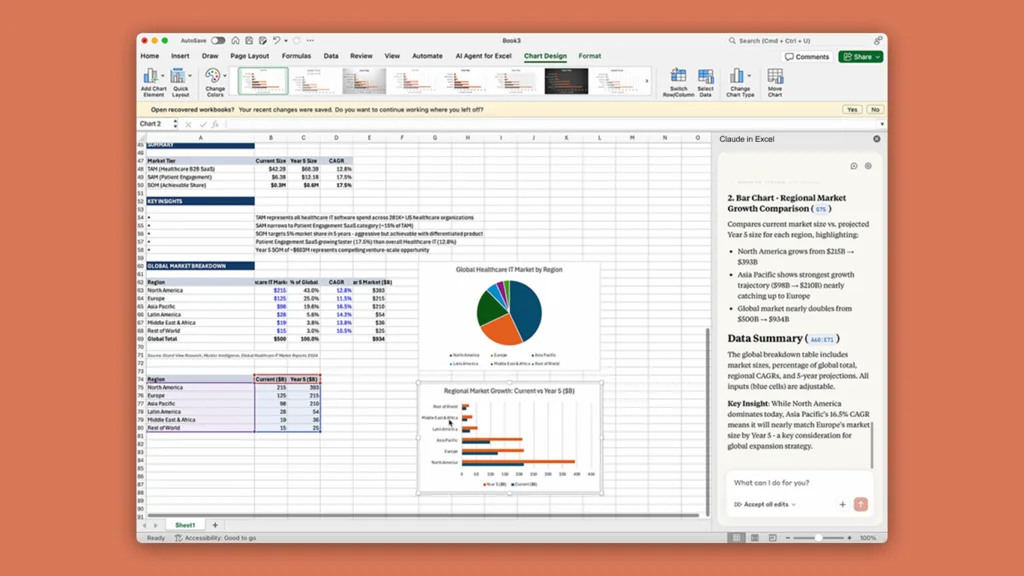
This is not a basic chatbot integration. Anthropic is positioning Claude as an “agentic” assistant — meaning it can go beyond answering questions and actively work inside documents, spreadsheets, and presentations, making changes in context while preserving formatting.
In short, Microsoft Office is quietly becoming one of the most important battlegrounds in the AI race.
Claude for Excel, Word and PowerPoint Is Now Available
Anthropic announced that Claude’s Microsoft 365 add-ins are now generally available, after being previewed earlier as part of its Microsoft productivity expansion plans. The integrations were first revealed back in October 2025, and this wider rollout signals that the company believes Claude is ready for serious professional use.
The add-ins work across web, Windows, and Mac, while Claude for Excel is also available on iPad. Users can install them through the Microsoft Marketplace, though enterprise access still depends on admin approval.
This is a major shift because it removes the biggest friction point for AI productivity tools: switching tabs. Instead of copying content into an AI chatbot and then pasting it back, Claude can now work directly where people already spend hours every day.
That’s the real future of AI adoption — invisible, embedded, and always available.
Who Gets Access to Claude Inside Microsoft 365?
The new Claude add-ins are currently available only to paying subscribers. Anthropic says access is limited to users on Claude Pro, Max, Team, and Enterprise plans.
This is not surprising. Microsoft 365 integration is a premium productivity layer, and Anthropic is clearly treating it as a flagship feature rather than a free experiment.
It also puts Claude in direct competition with Microsoft Copilot and Google Gemini Workspace tools — especially for users who want a more natural writing assistant and less of a corporate automation layer.
What Claude Can Do in Excel: More Than Formulas
Excel is one of the most powerful productivity tools ever built, but it’s also one of the most intimidating. Anthropic’s Claude integration is designed to act like a smart analyst sitting next to you.
Claude inside Excel can answer questions about your workbook, update assumptions, detect and debug spreadsheet errors, fill templates, and even assist with structured workflows that typically require advanced spreadsheet knowledge.
This is where Claude’s “agentic” approach becomes meaningful. Instead of just explaining how something works, it can actually help complete the work.
The move also reflects a larger 2026 AI trend: businesses no longer want AI that talks — they want AI that executes. That same shift is also visible in automation platforms, as explained in 9 Critical AI Agents in 2026: Why OpenAI Operator and Google Jarvis are Replacing Your Apps.
Claude in PowerPoint Can Build Full Decks and Edit Existing Slides
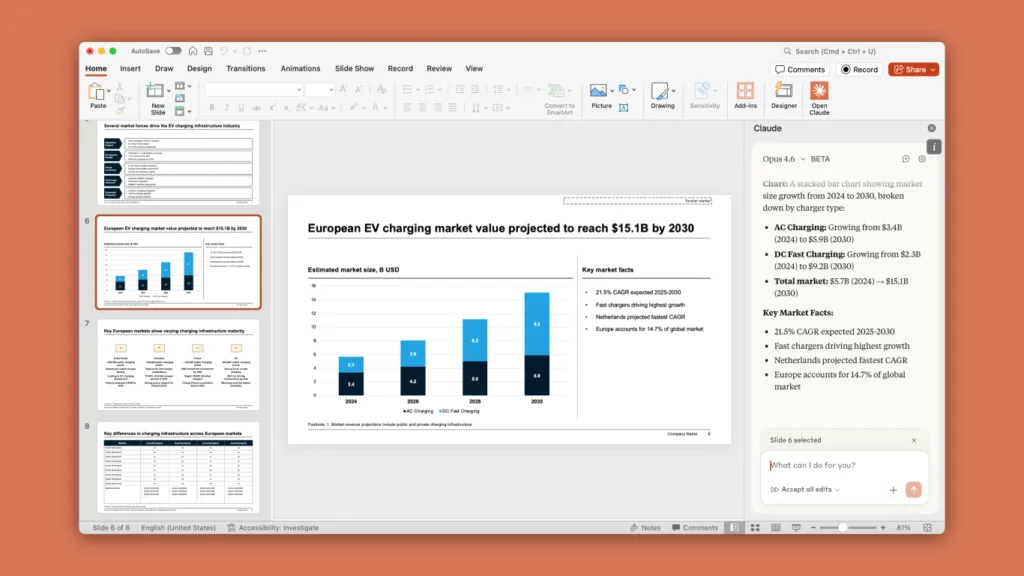
PowerPoint is another area where AI can realistically save hours. According to Anthropic, Claude inside PowerPoint can generate full presentations, create new slides, make edits, add diagrams and charts, and iterate on an existing deck while keeping the formatting intact.
That last part matters more than people realise. Most AI presentation tools fail because they ignore templates, branding, and structure — the exact things corporate presentations depend on.
If Claude can actually preserve design consistency while producing usable slides, it becomes far more than a novelty feature.
This is also why Microsoft 365 integrations are a bigger deal than standalone AI apps. The best AI tools are not the ones that generate content. They’re the ones that generate content while respecting the user’s workflow.
Claude for Word Targets Writing, Templates, and Document Cleanup
In Word, Claude’s integration is designed for heavy document editing, rewriting, and structured writing.
Anthropic says Claude can answer questions about a document, rewrite selected text while preserving formatting, fill templates with drafted content, and even interpret comment threads to help resolve edits more efficiently.
For students, writers, analysts, and corporate teams, this is the most natural use case for AI inside Office — because Word is where work gets finalised.
And with AI now embedded inside Word itself, users may no longer feel the need to open a separate chatbot window at all.
That is a real threat to standalone AI usage, and it’s why “agentic assistants” are becoming a defining topic this year, similar to what we covered in Beyond Chatbots: Why Perplexity’s “Digital Employee” Is the Real 2026 AI Breakthrough.
Outlook Integration Enters Public Beta
Anthropic also announced that Claude for Outlook has entered public beta, and while it is currently limited to select users, it is expected to expand further in the coming weeks.
Outlook integration may actually be the most important part of this rollout, because email is where time disappears. Anthropic says Claude in Outlook can surface priority messages, summarise long threads, draft replies in the user’s writing style, and even handle scheduling and meeting preparation.
It can also read attachments, summarise them, and generate a one-page brief for upcoming meetings — which is exactly the kind of workflow professionals want automated.
If Outlook integration becomes stable and widely available, it could become Claude’s strongest productivity advantage over consumer-first AI assistants.
Why This Matters: Microsoft Office Is Becoming the Real AI Operating System
The bigger story here isn’t Excel or PowerPoint. It’s that Microsoft 365 is slowly becoming the most important AI platform in the workplace.
AI inside Office apps doesn’t feel like “using AI.” It feels like Office got smarter.
And that is the fastest path to mainstream adoption.
Anthropic is betting that Claude can win by being the assistant that does real work inside the tools people already trust. That approach is similar to Google’s direction with automation-focused systems like Jarvis, which we covered in How to Use Google Project Jarvis: 7 Easy Steps Ultimate Setup Guide (2026).
TechularZtrix Verdict
Claude’s Microsoft 365 integration is one of the clearest signs that the AI industry is moving past the chatbot era. Instead of answering questions in a separate window, Claude can now actively operate inside Excel, Word, and PowerPoint — and soon, Outlook.
This is exactly what “agentic AI” is supposed to look like: not a conversation, but an assistant that edits, builds, fixes, and completes tasks inside the real workspace.
If Anthropic can make these add-ins reliable and fast, Claude could quietly become one of the most useful professional AI tools of 2026 — not because it’s flashy, but because it sits directly inside the world’s most-used productivity software.
For official access details, users can check the Microsoft Marketplace listing for Claude add-ins.
Yes, Anthropic has confirmed Claude add-ins for Excel, Word and PowerPoint are now generally available.
Claude for Outlook is currently in public beta and is available to select users.
Access is currently limited to Claude Pro, Max, Team, and Enterprise subscribers.
Yes, Claude can edit content, fill templates, generate slides, and preserve formatting in supported Microsoft apps.
Users can install Claude add-ins via the Microsoft Marketplace, while enterprise users may require admin approval.