Android 17 Hidden Features You Should Try Right Now (2026)
Quick Highlights
Android 17 is officially rolling out, and while Google spent most of its keynote focusing on headline features like Bubbles, Screen Reactions, and foldable gaming tools, the real value of the update is buried deeper in the system.
These are the upgrades you won’t see advertised, but you’ll definitely feel in everyday use — from smoother multitasking to stronger privacy control and smarter system behavior.
For most users, Android 17 will feel like a “small update.” In reality, it quietly changes how Android behaves at a system level.
App Bubbles quietly change multitasking forever
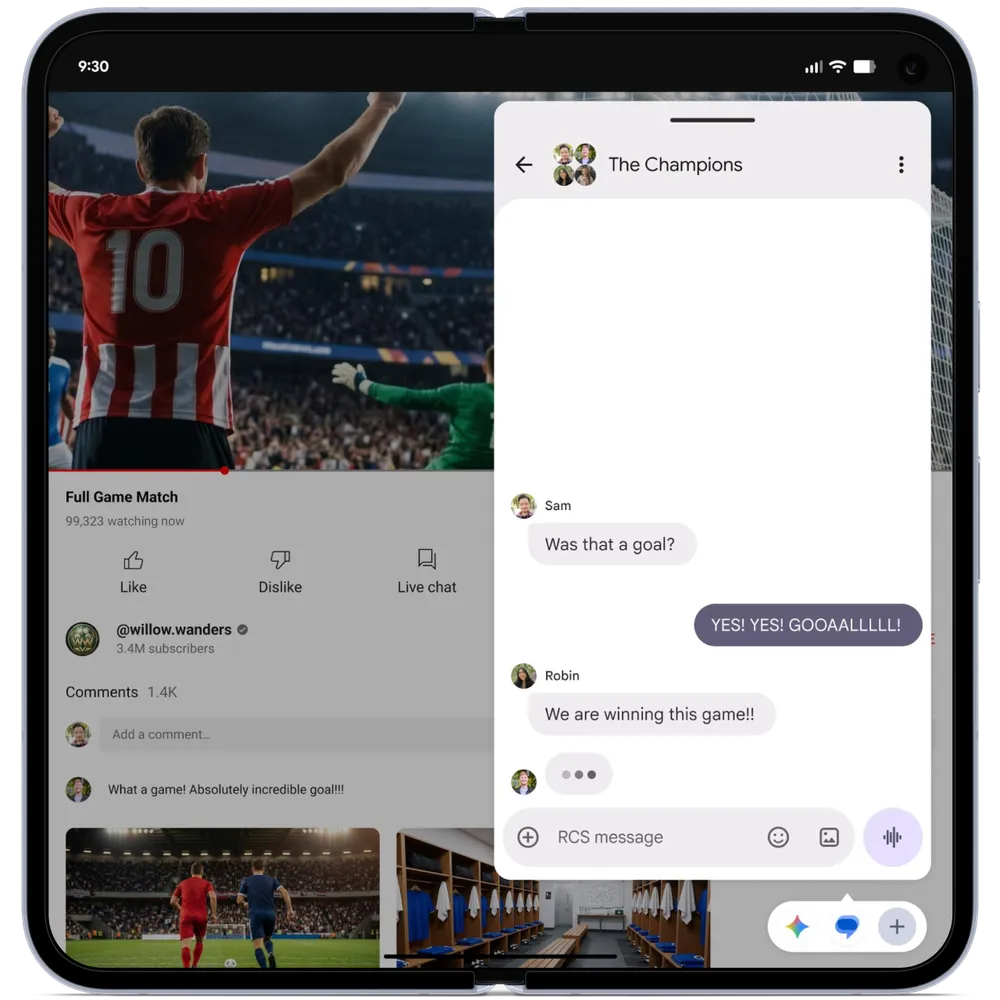
One of the most underrated changes in Android 17 is the expansion of App Bubbles, which now works across almost all modern Android devices instead of being limited to specific apps or foldables.
This means any supported app can now float over your screen as a movable bubble, allowing you to multitask without constantly switching between apps.
For example, you can reply to messages while watching videos, check notes while browsing the web, or keep a chat open while using maps.
This builds on the broader multitasking foundation discussed in How to Easily Find Saved Wi-Fi Passwords on Android in 2026, where system-level access and convenience features already play a big role in Android’s evolution.
On larger devices like tablets and foldables, Android 17 introduces a dedicated bubble dock that makes switching between active tasks even faster.
Split Quick Settings make Android faster to control
Android 17 brings back one of the most requested usability changes — separating Wi-Fi and mobile data into individual Quick Settings tiles.
In earlier Android versions, both were merged into a single “Internet” control panel, which required extra taps for simple tasks.
Now, users can toggle Wi-Fi or mobile data instantly, making quick network changes far more efficient.
This improvement also complements system optimization changes explained in Easy Guide: How to Clear Cache on Android in 2026 (App, Browser, and System Cache), where background performance tuning plays an important role in keeping Android smooth.
The result is a cleaner, faster control experience that reduces friction during everyday phone use.
Native app locking improves Android privacy
Android 17 finally introduces a system-level app lock feature that removes the need for third-party tools or manufacturer-specific solutions.
Users can now lock any app directly from the home screen using fingerprint, face unlock, or device PIN.
This means sensitive apps like banking, gallery, and messaging can be protected more securely at the system level.
Once locked, apps require biometric authentication every time they are opened, making unauthorized access significantly harder.
This is a major step forward for Android privacy, especially compared to older versions that depended heavily on OEM software layers.
Theft protection becomes much stronger
Security is one of the biggest focus areas in Android 17, and the improvements to Find Hub reflect that.
If a phone is stolen, Android now requires biometric authentication for critical actions like disabling tracking or resetting the device.
Even if someone knows your PIN, they won’t be able to fully control the phone without your identity verification.
Repeated incorrect attempts also trigger longer lockout delays, making brute-force access nearly impossible.
This strengthens Android’s anti-theft system significantly and reduces the resale value of stolen devices.
Screen recording gets a major upgrade
Android 17 improves the built-in screen recorder by adding support for front camera overlay.
This means users can record their screen while simultaneously showing their face in a floating window.
It’s especially useful for tutorials, reaction videos, walkthroughs, and educational content.
Creators no longer need external apps or complex editing setups for basic screen-based content creation.
This upgrade pushes Android further into creator-friendly territory without adding complexity.
Battery health tracking becomes native
One of the most practical upgrades in Android 17 is built-in battery health monitoring inside Settings.
Users can now see how much battery capacity remains compared to when the device was new.
This helps users understand battery degradation over time and decide when a replacement might be needed.
This feature is especially useful for long-term device owners and power users who rely heavily on battery performance.
Small UI improvements that actually matter
Android 17 also introduces several subtle interface upgrades that improve daily usability:
- Cleaner home screen layout with optional app label removal
- More control over dark mode behavior per app
- Improved background memory handling
- Reduced lag during multitasking
Individually, these changes seem minor, but together they make Android feel noticeably smoother and more responsive.
⚡ TechularZtrix Scan
📌 Bottom Line: Android 17 focuses less on visual redesign and more on meaningful system-level improvements that enhance multitasking, privacy, and performance.
🎯 Best For: Users who want better control over their phone, smoother multitasking, and stronger built-in security without third-party apps.
🏆 Biggest Win: Native app locking combined with upgraded theft protection makes Android 17 one of the most secure Android updates so far.
⚠️ Biggest Compromise: Not all features will roll out at the same time — OEM delays mean some users will wait months for full availability.
📈 Why It Matters: Android 17 represents a shift in Android strategy — moving away from flashy features and toward real usability improvements that impact daily smartphone behavior.
🔍 Difficulty Level: Easy
⏱️ Time Required: 10–15 minutes to explore settings
📱 Works On: Pixel first, followed by Samsung, OnePlus, Xiaomi, OPPO, Vivo, Realme devices during rollout cycle