Easy Guide: How to Hide Online Status on WhatsApp (Android and iPhone) in 2026
Quick Highlights
Sometimes you want to read messages without everyone knowing you’re online. Whether you’re avoiding distractions, protecting your privacy, or simply don’t want people tracking when you’re active, WhatsApp gives you complete control over your visibility settings.
The good news is that hiding your online status only takes a few seconds and doesn’t affect your ability to send messages, make calls, join groups, or share media. WhatsApp now offers more privacy controls than ever, allowing users to decide exactly who can see their activity.
If you’ve been searching for a simple way to hide your online status on WhatsApp while still using the app normally, this guide explains everything you need to know.
Why Hide Your Online Status?
Many users prefer to keep their activity private. Professionals may not want colleagues monitoring when they’re active, while students and everyday users often want to browse messages without feeling pressured to reply immediately.
WhatsApp’s privacy controls allow you to stay connected while maintaining greater control over your digital presence.
Important Things to Know
Before changing your settings, there are a few important limitations to understand.
- If you hide your Last Seen, you won’t be able to see other people’s Last Seen information
- Online status and Last Seen are linked through WhatsApp’s privacy system
- Messages and calls continue working normally
- You can hide your status from specific contacts without hiding it from everyone
- Read receipts and status updates have separate privacy settings
How to Hide Online Status on Android
Open WhatsApp and tap the three-dot menu in the upper-right corner. Select Settings and then tap Privacy.
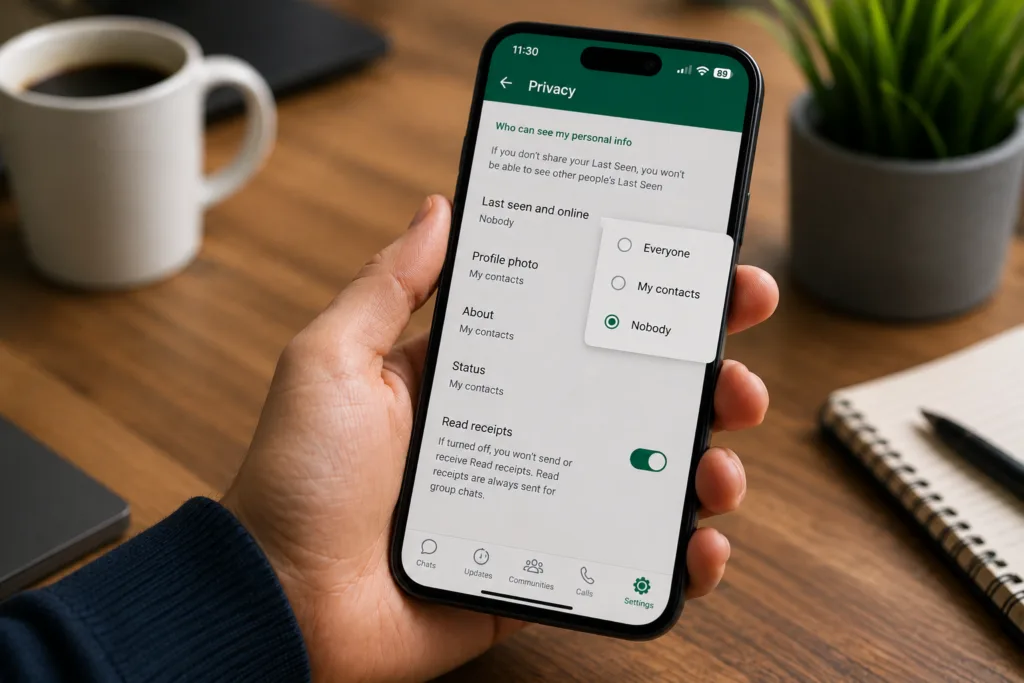
Inside the Privacy menu, select Last Seen and Online.
You’ll now see two separate options.
Under Who Can See My Last Seen, choose one of the following:
- Everyone
- My Contacts
- My Contacts Except…
- Nobody
If you want complete privacy, select Nobody.
Next, under Who Can See When I’m Online, choose Same as Last Seen.
Once selected, your online status will be hidden according to your Last Seen preference.
How to Hide Online Status on iPhone
Open WhatsApp and tap Settings in the bottom-right corner.
Navigate to Privacy and then tap Last Seen and Online.
Under Who Can See My Last Seen, choose your preferred visibility option.
For maximum privacy, select Nobody.
Then set Who Can See When I’m Online to Same as Last Seen.
The changes take effect immediately and no restart is required.
How to Hide Your Status From Specific People
One of WhatsApp’s most useful privacy features is My Contacts Except…
Instead of hiding your activity from everyone, this option lets you exclude specific contacts.
Open Settings → Privacy → Last Seen and Online and select My Contacts Except…
Choose the contacts you want to hide your activity from and save your selection.
Those contacts will no longer be able to view your Last Seen information, while everyone else continues to see it normally.
This is often the best option for users who only want privacy from a few individuals rather than their entire contact list.
Can You Read Messages Without Appearing Online?
Many users use Airplane Mode to read messages privately.
Enable Airplane Mode before opening WhatsApp, read the message, then completely close the app before reconnecting to the internet.
While this method can sometimes prevent your online status from updating, it is not a guaranteed privacy solution because WhatsApp’s synchronization behavior may change over time.
Using WhatsApp’s built-in privacy settings remains the most reliable option.
What Changes After Hiding Your Status?
Your messaging experience remains largely unchanged.
You can still:
- Send messages
- Receive messages
- Make voice calls
- Make video calls
- Join groups
- Share photos and videos
- Receive notifications
The only major trade-off is that WhatsApp applies privacy reciprocity. If you hide your Last Seen from others, you generally lose access to theirs as well.
Related WhatsApp Guides
If you’re improving your WhatsApp setup, you may also want to read:
For additional details about privacy controls, users can visit the official WhatsApp Help Center.
⚡ TechularZtrix Scan
📌 Bottom Line: WhatsApp’s privacy controls make it easy to use the app without constantly broadcasting your activity to everyone in your contacts list.
⏱ Difficulty Level: Easy
⌛ Time Required: Less than 1 minute
✅ Best For: Users who value privacy, professionals, students, and anyone who prefers responding to messages on their own schedule.
🔍 Why It Matters: Online status and Last Seen information reveal more about your daily habits than many people realize. Taking control of these settings helps create a more private messaging experience without sacrificing functionality.
💡 Best Option Right Now: For most users, setting both Last Seen and Online visibility to Nobody provides the strongest privacy. If you only need privacy from certain individuals, the My Contacts Except… option offers a more flexible solution.