Google Chrome 155 Finally Fixes One of Android’s Most Annoying Notification Problems
Quick Highlights
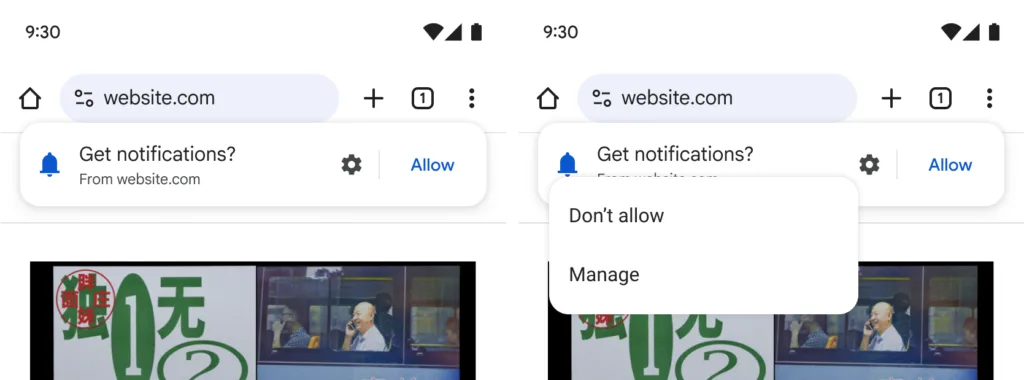
If you’ve ever opened a website on your Android phone only to be greeted by a large “Allow Notifications?” popup before reading a single sentence, you’re certainly not alone.
For years, notification permission requests have been one of the web’s most frustrating habits. Many websites ask for permission immediately after loading, often before visitors even know whether the content is worth following. The result has been predictable—most people instinctively tap Block or dismiss the prompt simply to continue browsing.
Google now wants to change that.
With Chrome 155, the company is introducing a redesigned notification permission experience that aims to make web browsing feel less disruptive while still allowing users to subscribe to useful website alerts whenever they choose.
Although the update may seem minor at first glance, it addresses one of the most common frustrations Android users experience every day.
Why Website Notification Requests Became So Frustrating
Browser notifications were originally introduced with a genuinely useful purpose.
When used correctly, they can inform users about:
- Order deliveries
- Flight price changes
- Live sports updates
- Breaking news
- Calendar reminders
- New messages
The problem wasn’t the technology—it was how websites started using it.
Instead of waiting until users had engaged with a website, many publishers began requesting notification permission the instant a page loaded.
Visitors were expected to make a decision before they had read an article, browsed a product, or even understood what the website offered.
Over time, this created what Google describes as notification prompt fatigue.
Rather than carefully considering whether notifications would actually be useful, users simply dismissed every request because the interruption itself had become irritating.
Chrome 155 Introduces a Friendlier Approach
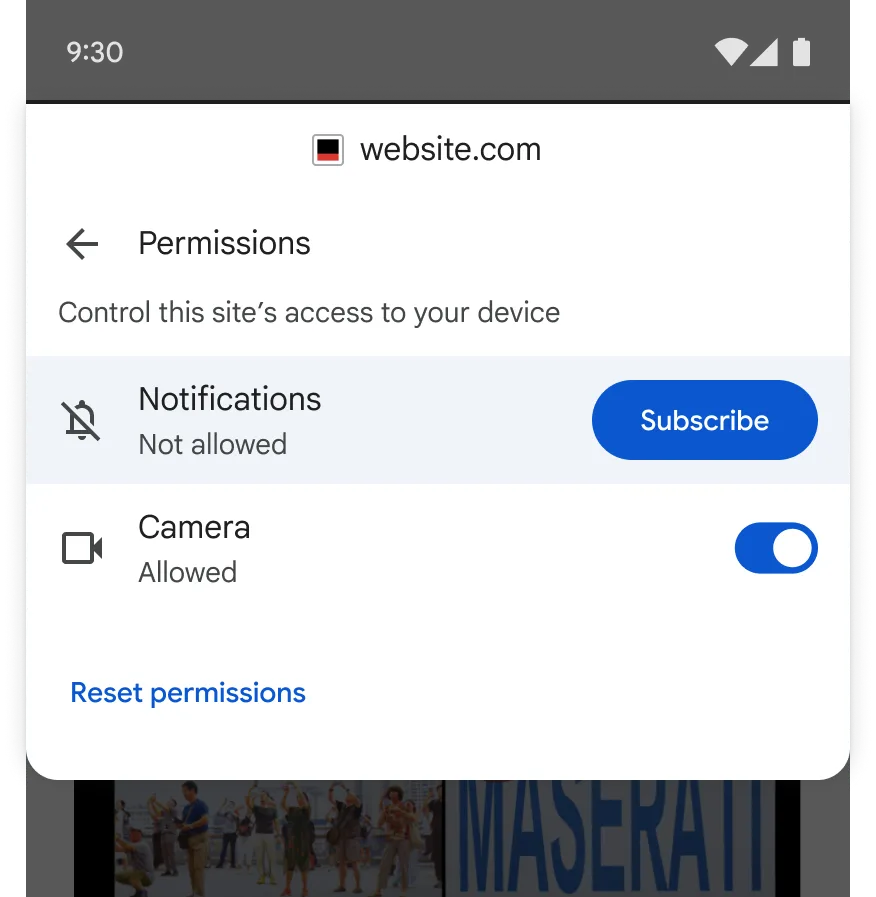
Google’s solution is surprisingly simple.
Instead of displaying a large blocking dialog that immediately interrupts browsing, Chrome 155 introduces a lighter notification interface that feels far less aggressive.
The new design allows users to continue reading while still making them aware that notification subscriptions are available.
According to Google’s own research, the redesigned interface maintains similar levels of user understanding while significantly reducing browsing friction.
In other words, users still recognise that a website offers notifications—but without feeling pressured into making an immediate decision.
That subtle change could dramatically improve the overall browsing experience.
You Don’t Need to Decide Immediately Anymore
One of the biggest improvements is flexibility.
Previously, users often faced an awkward choice:
- Allow notifications immediately
- Block them entirely
There wasn’t much middle ground.
Chrome 155 introduces a much more practical option.
If users ignore the initial notification request, they can still subscribe later through Chrome’s Site Controls menu.
This means notification permissions are no longer treated as a one-time opportunity.
Instead, users can continue browsing normally and decide later whether a particular website has earned a place among their trusted notification sources.
It’s a small usability improvement, but one that gives people considerably more control over how websites communicate with them.
Notification Requests Will No Longer Linger Forever
Google is also changing what happens when users simply ignore the permission prompt.
Under the new system, unanswered notification requests automatically expire after a short period.
This prevents outdated permission requests from remaining active while users continue browsing.
For developers, the change requires some adjustments to how websites monitor notification permissions.
For everyday users, however, the benefit is straightforward.
The browser becomes cleaner, less cluttered, and considerably less distracting.
Google Wants Websites to Ask at the Right Moment
Perhaps the most important change isn’t technical at all—it’s behavioural.
Google is encouraging website owners to stop requesting notifications the moment someone lands on their homepage.
Instead, developers should only ask when the request actually makes sense.
For example:
- Shopping websites should request permission after customers place an order, allowing delivery updates.
- News websites should suggest topic alerts after readers have shown interest in a particular subject.
- Travel websites should offer fare alerts only after users search for flights.
These examples all share one thing in common.
The notification request appears after users understand its value.
That approach makes permission requests feel helpful instead of intrusive.
Why This Small Update Matters More Than It Looks
On paper, Chrome 155’s notification redesign doesn’t sound revolutionary.
There’s no flashy AI feature, dramatic interface overhaul, or major performance boost.
Yet it tackles something Android users encounter almost every day.
Permission pop-ups have become so common that many people no longer read them. Instead, they instinctively dismiss every request, even when notifications from a particular website could actually be useful.
Google’s redesign isn’t trying to convince users to allow more notifications. Instead, it’s attempting to create a system where people make better decisions because they’re asked at the right time instead of the wrong one.
For users, that means fewer interruptions.
For websites, it means visitors are more likely to subscribe when they genuinely find value in doing so.
It’s a rare example of a feature that benefits both sides.
Chrome Is Becoming Less Distracting
Google has spent the past few Android releases refining how users interact with notifications.
Instead of constantly demanding attention, newer Android features increasingly focus on reducing interruptions while keeping important information easily accessible.
Chrome 155 follows the same philosophy.
Rather than removing website notifications altogether, Google is redesigning how users encounter them.
The result is a browsing experience that feels calmer without sacrificing useful functionality.
It also reflects Google’s broader software direction.
Across Android, Chrome, and Gemini, the company appears to be prioritising experiences that assist users without constantly interrupting them.
That same philosophy can be seen throughout Android 17 Officially Rolls Out With Powerful New Multitasking, Privacy and Gaming Features, where multitasking, privacy, and usability improvements receive just as much attention as headline AI additions.
A Better Experience Doesn’t Mean More Notifications
Some users may worry that making notification prompts easier to access will encourage websites to send even more alerts.
In reality, the opposite may happen.
When permission requests appear after users understand their purpose, they’re far more likely to subscribe only to services they actually care about.
That naturally reduces unnecessary subscriptions while improving engagement for websites providing genuinely useful updates.
For example, receiving delivery tracking notifications after placing an online order feels helpful.
Receiving a notification request before you’ve even viewed a product catalogue usually does not.
By encouraging websites to ask later rather than sooner, Google hopes to improve both user satisfaction and notification quality.
Android vs iPhone: Different Approaches to User Experience
Interestingly, Chrome’s notification redesign arrives as both Google and Apple continue refining their respective ecosystems.
Apple has focused heavily on improving the overall iPhone software experience through updates like iOS 27 Has More Than 20 Hidden Features Apple Didn’t Mention During WWDC 2026, introducing numerous refinements designed to make daily interactions smoother.
Google, meanwhile, appears to be concentrating on reducing friction across Android itself.
Instead of introducing another completely new feature, Chrome 155 quietly improves something millions of users already interact with every day.
While neither company is copying the other directly, both are increasingly competing through quality-of-life improvements rather than headline features alone.
When Will Chrome 155 Be Available?
Google says the redesigned notification permission experience will begin rolling out with Chrome 155 for Android.
Availability will expand gradually as newer Chrome versions become available through the Google Play Store.
Because Chrome updates independently from Android system updates, users won’t necessarily need to wait for a new Android version to receive the redesigned interface.
Once Chrome 155 reaches their device, the lighter notification experience should activate automatically.
Website owners and developers may still need to update how their sites handle notification permissions, so users may notice the benefits becoming more apparent over the coming months as more websites adopt Google’s recommendations.
The Bigger Picture
This update demonstrates something increasingly important about modern software.
Not every meaningful improvement needs artificial intelligence or completely new features.
Sometimes the biggest quality-of-life upgrades come from making existing experiences feel less frustrating.
For Android users who browse dozens of websites every week, even a small reduction in interruptions can make the web feel noticeably cleaner.
It won’t change how Chrome looks.
It won’t make websites load dramatically faster.
But it may finally stop one of the internet’s most persistent annoyances from interrupting your browsing before you’ve even had a chance to read the page.
⚡ TechularZtrix Scan
📌 Bottom Line: Chrome 155 introduces a smarter notification permission system that makes Android browsing feel less intrusive without removing useful website notifications.
⏱ Difficulty Level: None
⌛ Availability: Rolling out with Chrome 155 for Android.
✅ Best For: Android users who frequently browse websites and are tired of constant notification permission pop-ups.
🏆 Biggest Win: Users can ignore notification requests without permanently losing the option to subscribe later through Chrome’s Site Controls.
⚠️ Biggest Compromise: Websites will need time to update their notification strategies before the full benefits become noticeable.
📈 Why It Matters: Small interface improvements often have the biggest long-term impact on daily usability. Chrome’s redesigned notification system should make web browsing noticeably less distracting for millions of Android users.
🔍 What Happens Next: As Chrome 155 becomes widely available and developers adopt Google’s contextual prompting recommendations, users should gradually encounter fewer unnecessary notification requests and more meaningful subscription opportunities.