Google Expands Gemini in Chrome With AI Tab Summaries, Gmail Actions and Image Editing Features
Quick Highlights
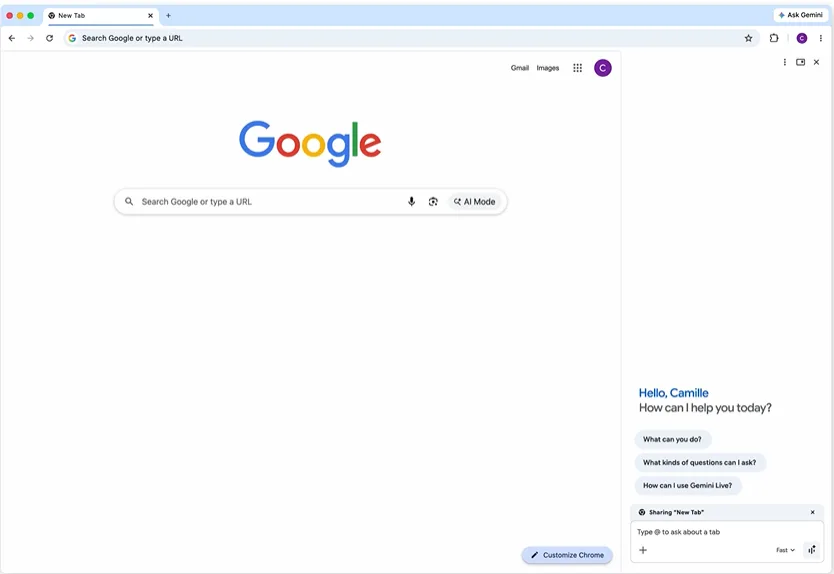
Google is continuing its push to bring artificial intelligence directly into everyday browsing experiences. The company has announced a broader rollout of Gemini in Chrome, expanding access to users across Latin America, Africa, the Middle East, and several additional regions.
The move represents another major step in Google’s effort to transform Chrome from a traditional browser into a more capable productivity platform. Rather than simply helping users search the web, Gemini is increasingly being positioned as an assistant that can understand content, perform tasks, and interact with Google’s ecosystem of services without requiring users to jump between multiple tabs and applications.
For Chrome users, the expansion means access to some of Google’s most advanced AI-powered browsing features directly within the browser itself.
Gemini in Chrome Is Becoming More Than a Search Tool
One of Gemini in Chrome’s most practical features is its ability to understand and summarize content from webpages.
Instead of manually reading lengthy articles, reports, or documentation, users can ask Gemini to generate concise summaries or highlight key information. The assistant can also compare information across multiple open tabs, helping users conduct research without constantly switching between pages.
This type of workflow assistance is becoming increasingly important as web browsing evolves beyond simple search and navigation. Users now expect browsers to help organize information, identify key insights, and reduce the time spent sorting through large amounts of content.
The broader industry is moving in a similar direction. AI assistants are gradually becoming embedded across productivity software, communication platforms, and consumer services. We recently saw a comparable trend with Microsoft Scout Brings OpenClaw-Style AI Assistance to Microsoft 365 Users, where AI tools are being integrated directly into workplace applications rather than existing as standalone products.
Deep Integration With Google’s Ecosystem
Perhaps the most significant advantage Gemini in Chrome has over competing browser assistants is its access to Google’s existing services.
Users can ask Gemini to create calendar events, draft emails through Gmail, check locations using Maps, and answer questions about YouTube videos without leaving the page they are currently viewing.
These integrations aim to eliminate some of the friction that comes from constantly moving between browser tabs and applications.
For example, while reading an event announcement online, users can ask Gemini to create a calendar entry. Someone planning a trip can retrieve location details from Google Maps while staying on the same webpage. Similarly, email drafts can be generated directly through Gmail integrations without opening separate browser windows.
The strategy highlights Google’s broader vision for AI: embedding assistance into workflows rather than forcing users to launch dedicated chatbot applications every time they need help.
AI Image Editing Arrives Through Nano Banana 2
Google is also introducing new image-generation and editing capabilities powered by Nano Banana 2.
The feature allows users to modify images they find online using text prompts directly within Gemini’s side panel. Instead of exporting images to separate editing tools, users can request adjustments through natural-language instructions.
While Google has not positioned Nano Banana 2 as a replacement for professional creative software, the capability reflects a growing trend toward lightweight AI-assisted editing tools that are integrated directly into everyday applications.
The company is clearly betting that convenience will become one of AI’s strongest selling points.
Personal Intelligence Expands Context Across Google Services
Another notable addition is Personal Intelligence, which allows Gemini to draw context from connected Google services such as Gmail, Search, Photos, and YouTube.
The goal is to provide more personalized answers based on information already available within a user’s Google account.
For example, Gemini could potentially reference previous searches, emails, saved photos, or YouTube activity when helping answer questions or complete tasks.
Google says these experiences are designed to deliver more relevant and contextual responses while remaining under user control.
The approach mirrors developments happening across the broader AI industry, where companies are increasingly focusing on assistants that understand personal context rather than simply responding to individual prompts.
A similar consumer-facing trend can already be seen in messaging platforms through tools like How to Use Meta AI in WhatsApp (2026), where AI assistants are becoming integrated into applications people already use every day.
Security Remains a Major Focus
As AI assistants gain access to more personal information and connected services, security concerns inevitably become more important.
Google says Gemini in Chrome includes safeguards designed to identify known threats, including prompt injection attacks that attempt to manipulate AI systems into performing unintended actions.
The company has also implemented confirmation requirements before sensitive actions are completed, helping reduce the risk of accidental changes or unauthorized requests.
While no AI platform is immune to misuse, Google appears focused on balancing convenience with user control as these capabilities become more deeply integrated into Chrome.
Why This Expansion Matters
The bigger story here isn’t simply that Gemini in Chrome is reaching more countries.
What’s becoming increasingly clear is that Google sees the browser as the future home of its AI ecosystem.
For decades, web browsers primarily acted as gateways to information. Gemini is gradually turning Chrome into something more active — a tool that can understand content, perform tasks, interact with services, and assist users throughout their workflow.
That shift could fundamentally change how people browse the web over the next several years.
Users interested in testing Gemini’s latest browser features or checking regional availability can visit Google’s official Gemini in Chrome documentation for supported markets, feature details, and setup instructions.
⚡ TechularZtrix Scan
📌 Bottom Line: Google is steadily transforming Chrome from a web browser into an AI-powered productivity platform that can understand content, complete tasks, and interact with Google’s broader ecosystem.
🎯 Target Audience: Students, researchers, professionals, creators, and anyone who spends significant time working inside a browser.
🏆 Biggest Win: Deep integration with Gmail, Calendar, Maps, Search, Photos, and YouTube creates a more seamless workflow than standalone AI assistants can currently offer.
⚠️ Biggest Compromise: Many of the most powerful capabilities rely heavily on Google’s ecosystem, which may not appeal to users who prefer platform-independent tools.
🌏 Market Reality Check: Browser-based AI assistants are becoming one of the most important battlegrounds in the AI industry, and Chrome’s massive user base gives Google a significant advantage.
🔍 What Happens Next: Expect Google to continue expanding Gemini’s role inside Chrome, with future updates likely bringing deeper personalization, broader automation capabilities, and more advanced task execution.